1 / 18
How it works
Buy once, build it every year
01
Buy it here
Pay once through our secure Stripe checkout. Your receipt carries your order code and a link to your order.
02
Open your builder
Your order page has an Open your planner builder button. On another device, Find my order opens it with your email and order code.
03
Build it, every year
Make nine choices, watch the preview follow them, and download one hyperlinked PDF. Next year, come back and build the new edition.
Your choices
Nine choices, all yours
- 1
Which way round. Landscape or portrait.
- 2
Year. This one, next year, or any year ahead, dated for you.
- 3
Week start. Monday or Sunday.
- 4
Language. One of 14: English, 日本語, 한국어, Deutsch, Español, Français, 繁體中文, 简体中文, Italiano, Português, Nederlands, ไทย, Türkçe, Русский.
- 5
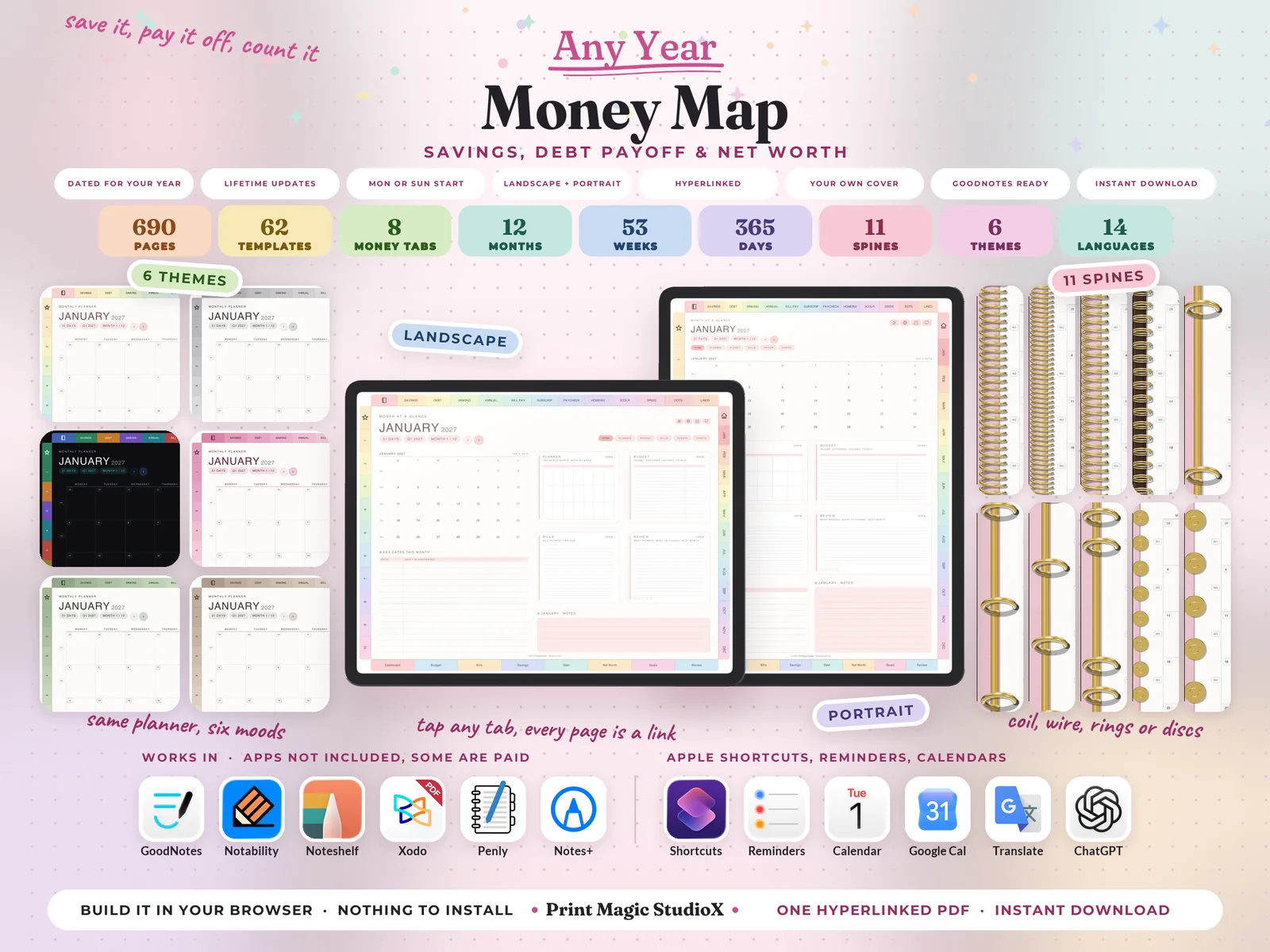
Theme. One of 6: Pastel Rainbow, White, Dark Mode, Pink, Matcha, Boho.
- 6
Ring and spine. 11 styles: coil, fine coil, twin wire, wire on a bar, 2 rings, 3 rings, 4 rings, 6 rings, discs, big discs, or none at all, in gold, silver, rose gold or black, down the left edge or in the middle as an open notebook.
- 7
Cover. The planner's own cover designs, or your own picture with your own words on it.
- 8
Your own sections. Ten sections of your own, named by you.
- 9
Note papers. The twelve included (Savings Tracker, Debt Tracker, Sinking Funds Tracker, Annual Expense Overview, Bill Payment Tracker, Subscription Tracker, Paycheck Budget, Home Inventory, Three-column ruled, Small square grid, Classic dot grid, Classic ruled), or pick from two hundred more.
Inside
What you get
- ✓690 pages in one hyperlinked PDF, a little more when you add note papers of your own.
- ✓12 months, each opening on a Month at a Glance with its key dates, then the full calendar, the month's budget, a bill payment page and the review that closes it.
- ✓61 week pages, one for every week of every month, in tall columns with The One Thing, weekly anchors, a habit grid and what rolls over to next week.
- ✓365 daily pages in half hours from 6 am to 10 pm, with a to-do list, what you spent today and its total, a no-spend box, what you are grateful for, how tomorrow starts and notes.
- ✓4 quarterly planners, and a habit tracker for every month.
- ✓62 money templates in 8 tabs: Dashboard, Budget, Bills, Savings, Debt, Net Worth, Goals, Review — budgets and pay logs, bill and subscription trackers, savings jars, debt payoff plans, net worth and the reviews that close the year.
- ✓An index with a link to every part of the planner, from the quarters and months to each tab's templates, the note papers and your own sections, and a page 2 that sets up every integration.
- ✓Tabs on every edge, landscape or portrait: months down one side, your sections down the other, the 8 money tabs along the bottom and the note papers along the top.
Everything is a link
Tap a month tab and its landing page opens. Tap a date on any grid and that day opens. The + beside every hour on a daily page makes an Apple Reminder for that time, and the G beside it opens the hour in Google Calendar. Four Apple Shortcuts, Tools, Translate, Calendar and Chat, sit on every page but the cover and the index, set up once from page 2.
Write in it with
 GoodNotes
 Notability
 Xodo
Xodo Penly
Penly Notes+
Its links open
 Shortcuts
 Reminders
 Calendar
 Google Cal
 Translate
 ChatGPT
Templates
62 templates in 8 tabs
Each tab sits along the foot of every page inside, and has its own landing page.
7 templates
Dashboard
- Money map
- Account map
- Account directory
- Money health check
- Money dates
- Money rhythm
- Money admin
7 templates
Budget
- Zero-based budget
- 50/30/20 split
- Payday flow
- Spending log
- Cash envelopes
- No-spend month
- Holiday season money
6 templates
Bills
- Bills by payday
- Bills by account
- Bills, month by month
- Once-a-year bills
- Subscription audit
- Bill cutter
10 templates
Savings
- Six savings jars
- Sinking fund tracker
- Savings account ledger
- Emergency cushion
- Savings rate
- Found money
- Where savings earn most
- Paid off, now saved
- 52-week savings challenge
- 100-envelope challenge
8 templates
Debt
- Debt payoff ladder
- Snowball or avalanche
- Snowball roll-up
- Debt ledger
- What interest costs
- Credit card use
- Credit score
- Debt left, month by month
9 templates
Net Worth
- Balance sheet
- Net worth, month by month
- What I own
- What I owe
- Investments
- Retirement pots
- Home and car
- Protect what you have built
- Net worth milestones
8 templates
Goals
- Money goals for the year
- Goals, costed
- Freedom number
- Giving
- Life after debt
- My money rules
- Five-year money plan
- Long-term money goals
7 templates
Review
- Weekly money date
- Month-end close
- Spending audit
- Quarter review
- Money wins
- Year-end statement
- Money mindset
Good to know
Before you buy
- •You need an app that writes on PDFs: GoodNotes, Notability, Noteshelf, Xodo, Penly, Notes+ or any other. GoodNotes, Notability and Noteshelf are paid apps, some with a free tier; Xodo and Penly have free versions. Apps are not included.
- •The + beside every hour and the four Apple Shortcuts work on iPhone and iPad. The G beside every hour opens Google Calendar in your browser on any device.
- •Nothing to install and no account to make. On a computer the planner builds in your browser; on a phone or tablet we build it on our side and it downloads when it is ready.
- •For your own planning. Please do not share the file, your order code or the builder link.
- •A digital product: nothing is posted, and colours can look a little different from screen to screen. Our refund policy covers the rest.
$9.99 · one payment
Money Map
Build it after checkout, and every year's edition after that with the same order.
Buying agrees to our terms and refund policy, and asks us to deliver the file straight away.
Questions first? Message us.