1 / 20
The walkthrough
Four minutes through the whole planner
Every part of the book on the Paper Pro itself: the index, the tabs on two edges, the quarters, months, weeks and days, the habit tracker, the templates and the note papers.
How it works
Buy once, build it every year
01
Buy it here
Pay once through our secure Stripe checkout. Your receipt carries your order code and a link to your order.
02
Open your builder
Your order page has an Open your planner builder button. On another device, Find my order opens it with your email and order code.
03
Build it, every year
Make nine choices, watch the preview follow them, and download one hyperlinked PDF. Next year, come back and build the new edition.
Your choices
Nine choices, all yours
- 1
Which hand. Right or left handed. The months and the Index ride the edge your writing hand does not cover.
- 2
Toolbar space. A blank strip down the left edge or the right, so the device's own toolbar hides nothing, or no strip at all.
- 3
Year. This one, next year, or any year ahead, dated for you.
- 4
Week starts. Monday or Sunday, on every calendar, month grid and weekly page.
- 5
Language. One of 14: English, 日本語, 한국어, Deutsch, Español, Français, 繁體中文, 简体中文, Italiano, Português, Nederlands, ไทย, Türkçe, Русский.
- 6
Theme. Pastel Rainbow or White, the two that read well on e-ink.
- 7
Cover. The planner's own cover with your name in its bar, or a picture of your own.
- 8
Your own sections. Ten tabs of your own, named by you.
- 9
Note papers. The ten included (Classic ruled, Classic square grid, Classic dot grid, Blank paper, Cornell + summary, Checklist notes, Two-column ruled, Three-column ruled, Narrow ruled, Wide ruled), or pick from two hundred more.
Inside
What you get
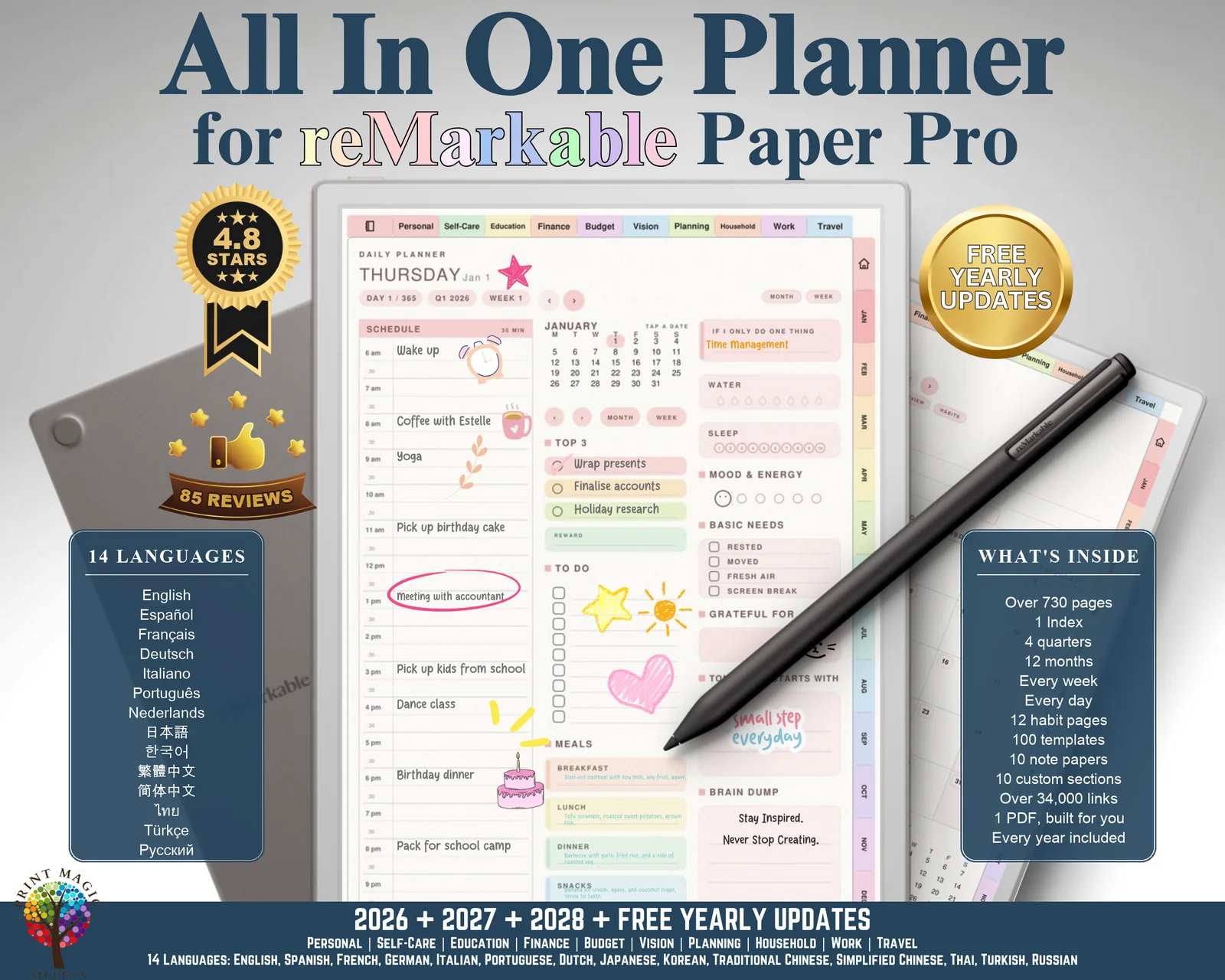
- ✓Over 730 pages in one hyperlinked PDF, a little more when you add note papers of your own.
- ✓12 months, each with a Month at a Glance landing page and Planner, Overview, Budget, Review and Habits buttons, plus the full calendar with key dates, to do and notes.
- ✓A weekly page for every week, in tall columns with The One Thing, weekly anchors, a habit grid and wins.
- ✓A page for every day with a half-hour schedule from 6 am to 9 pm, Top 3, to do, meals, water, sleep, mood and energy, grateful for, tomorrow starts with and a brain dump.
- ✓4 quarterly planners: what the quarter is for, focus by month, dates already fixed, how it went and highlights.
- ✓A monthly review and a habit tracker with a card per habit, behind every month.
- ✓An index with a link to every part of the planner, from the quarters and months to each tab's templates and the note papers.
- ✓Tabs on two edges only: the months and the Index down one side, the ten template categories along the top, and nothing along the foot, where your hand rests.
Every tab is a link
Tap a month tab and its landing page opens. Tap a date on any grid and that day opens. Month, week and day buttons sit on every page, and the Index is a house on the rail. Over 34,000 links, all inside the PDF, with nothing to set up on the device.
Onto the tablet, four ways
- •The reMarkable app on your computer: drag the PDF in, and it syncs to the tablet.
- •The reMarkable app on your phone: share the PDF to it.
- •my.remarkable.com in a browser: upload it there.
- •A USB cable: open 10.11.99.1 with the tablet plugged in.
Templates
100 templates in 10 categories
Each category has its own tab along the top of every page, and its own landing page.
17 templates
Personal
- Goal Tracker
- Self-Discovery Journal
- Motivation Board
- Hobbies & Interests Tracker
- Life Milestones Tracker
- Personal Values List
- Personal SWOT Analysis
- Social Tracker
- Gratitude Log
- Personal Manifesto
- Pet Care Planner
- Mood Log
- Reading Log
- Bucket List Tracker
- Dream Journal
- Friendship Tracker
- Birthday List
10 templates
Self-Care
- Self-Care Checklist
- Mood Tracker
- Habit Tracker
- Gratitude Journal
- Positive Affirmations
- Daily Reflection
- Fitness Tracker
- Sleep Tracker
- Water Tracker
- 30-Day Challenge
10 templates
Education
- Study Schedule
- Assignment Planner
- Class Information
- Revision Tracker
- Research Project
- Grade Tracker
- Reading List
- Lesson Planner
- Weekly Timetable
- Vocabulary Log
9 templates
Finance
- Monthly Budget Planner
- Debt Tracker
- Bill Payment Tracker
- Savings Goal Tracker
- Expense Tracker
- Investment Tracker
- Subscription Tracker
- Emergency Fund Planner
- No-Spend Challenge
9 templates
Budget
- Weekly Budget
- Grocery Budget
- Holiday / Travel Budget
- Event Budget
- Gift Budget
- Pet Care Budget
- Clothing Budget Tracker
- Sinking Funds
- Paycheck Plan
9 templates
Vision
- Vision Board
- Long-Term Goals Planner
- 5-Year Plan
- Monthly Vision Reflection
- Dream Journal
- Career Vision
- Relationship Vision
- Wheel of Life
- Word of the Year
9 templates
Planning
- Goal Planner
- Priority Planner
- To-Do List
- Project Planner
- Event Planner
- Weekly Overview
- Daily Timeline
- Goal Action Plan
- Monthly Goals
9 templates
Household
- Chore Chart
- Meal Planner
- Cleaning Tracker
- Appointments
- Maintenance Jobs
- Recipe Planner
- Family Calendar
- Grocery List
- Plant Care
9 templates
Work
- Daily Work Planner
- Work Planner
- Project Tracker
- Inbox Tracker
- Meeting Notes
- Task List
- Brainstorming
- Contact List
- Weekly Review
9 templates
Travel
- Travel Itinerary
- Packing Checklist
- Budget Travel Planner
- Trip Overview
- Weekly Travel Planner
- Accommodation Planner
- Places to Visit
- Road Trip Planner
- Travel Journal
Questions
Questions people ask
Which reMarkable does it work on?
Do the links work on the reMarkable?
How do I put it on my reMarkable Paper Pro?
I write with my left hand. Does it suit me?
Is it dated? Which years?
Does it have the Apple Shortcuts and Reminders links?
What does it cost?
Good to know
Before you buy
- •Drawn for the reMarkable Paper Pro, page for page. It is not laid out for the Paper Pro Move.
- •Colours look softer on the reMarkable's e-ink screen than they do on the photos here, which are taken from the file itself.
- •The links inside the planner work on the tablet. There are no Apple Shortcuts or Reminders links in this edition: those belong to iPad.
- •Nothing to install and no account to make. On a computer the planner builds in your browser; on a phone or tablet we build it on our side and it downloads when it is ready.
- •For your own planning. Please do not share the file, your order code or the builder link.
- •A digital product: nothing is posted, and colours can look a little different from screen to screen. Our refund policy covers the rest.
US$9.99US$7.99 · 20% off
All-in-One Planner for reMarkable Paper Pro
Build it after checkout, and every year's edition after that with the same order.
Buying agrees to our terms and refund policy, and asks us to deliver the file straight away.
4.6on Etsy from 3,800+ reviews · 48,000+ sales
Questions first? Message us.