1 / 18
How it works
Buy once, build it every year
01
Buy it here
Pay once through our secure Stripe checkout. Your receipt carries your order code and a link to your order.
02
Open your builder
Your order page has an Open your planner builder button. On another device, Find my order opens it with your email and order code.
03
Build it, every year
Make nine choices, watch the preview follow them, and download one hyperlinked PDF. Next year, come back and build the new edition.
Your choices
Nine choices, all yours
- 1
Which way round. Landscape or portrait.
- 2
Year. This one, next year, or any year ahead, dated for you.
- 3
Week start. Monday or Sunday.
- 4
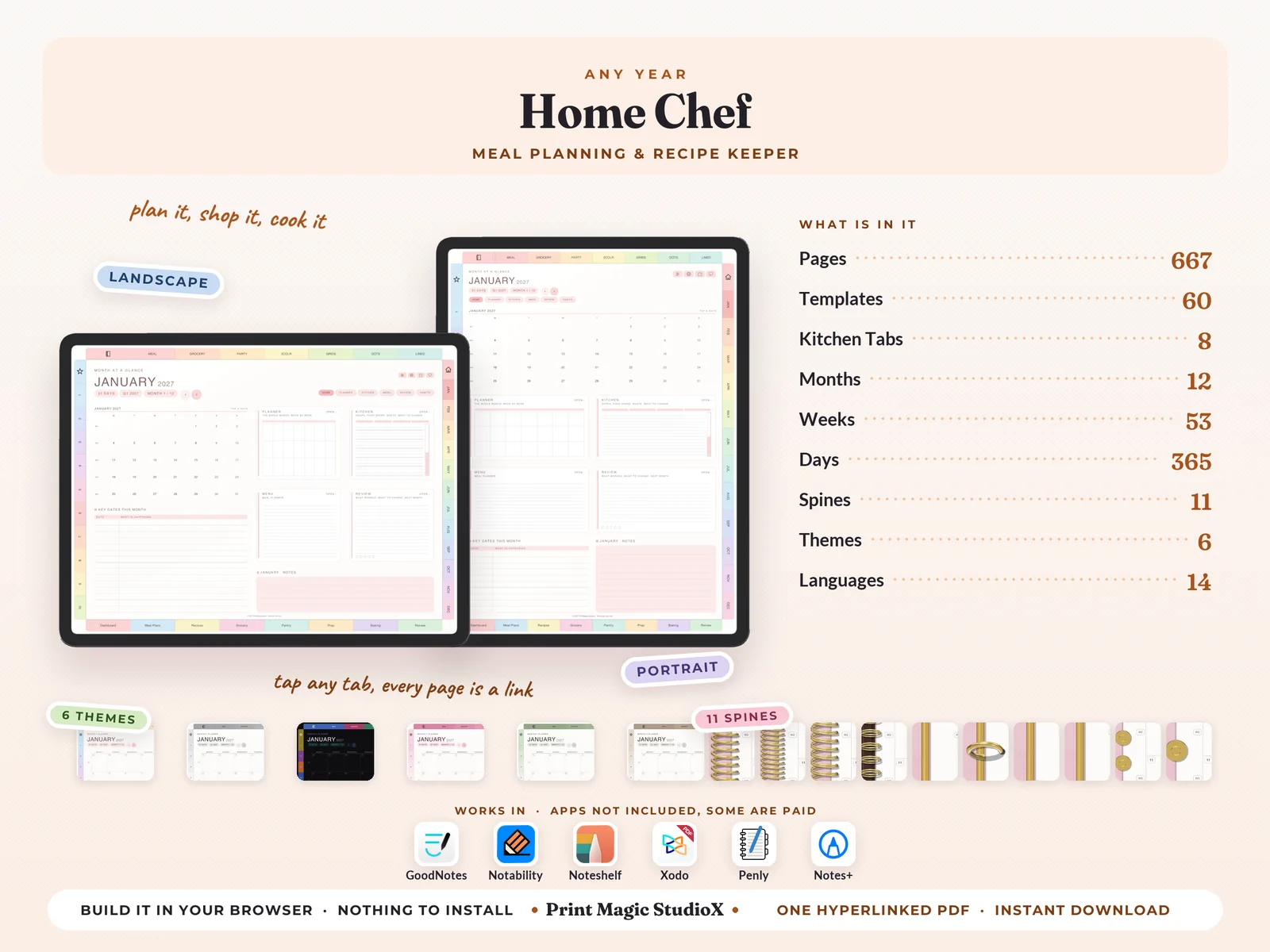
Language. One of 14: English, 日本語, 한국어, Deutsch, Español, Français, 繁體中文, 简体中文, Italiano, Português, Nederlands, ไทย, Türkçe, Русский.
- 5
Theme. One of 6: Pastel Rainbow, White, Dark Mode, Pink, Matcha, Boho.
- 6
Ring and spine. 11 styles: coil, fine coil, twin wire, wire on a bar, 2 rings, 3 rings, 4 rings, 6 rings, discs, big discs, or none at all, in gold, silver, rose gold or black, down the left edge or in the middle as an open notebook.
- 7
Cover. The planner's own cover designs, or your own picture with your own words on it.
- 8
Your own sections. Ten sections of your own, named by you.
- 9
Note papers. The seven included (Meal Planner, Grocery List, Party Planner, Two-column ruled, Small square grid, Classic dot grid, Classic ruled), or pick from two hundred more.
Inside
What you get
- ✓667 pages in one hyperlinked PDF, a little more when you add note papers of your own.
- ✓12 months, each opening on a Month at a Glance with its key dates, then the full calendar, the month's kitchen page, a menu behind its own button, and the review that closes it.
- ✓61 week pages, one for every week of every month, with The One Thing across the top, open bands for the seven days, weekly anchors, a habit grid and what rolls over to next week.
- ✓365 daily pages in half hours from 6 am to 10 pm, with a to-do list, what you spent today, a brain dump, how tomorrow starts and notes.
- ✓4 quarterly planners, and a habit tracker for every month.
- ✓60 kitchen templates in 8 tabs: Dashboard, Meal Plans, Recipes, Grocery, Pantry, Prep, Baking, Review — from the weekly meal board and theme nights to recipe cards, the shop aisle by aisle, the cupboard and the freezer, prep day, baker's percentage and what the food cost.
- ✓An index with a link to every part of the planner, from the quarters and months to each tab's templates, the note papers and your own sections, and a page 2 that sets up every integration.
- ✓Tabs on every edge, landscape or portrait: months down one side, your own sections down the other, the 8 kitchen tabs along the bottom and the note papers along the top.
Everything is a link
Tap a month tab and its landing page opens. Tap a date on any grid and that day opens. The + beside every hour on a daily page makes an Apple Reminder for that time, and the G beside it opens the hour in Google Calendar. Four Apple Shortcuts, Tools, Translate, Calendar and Chat, sit on every page but the cover and the index, set up once from page 2.
Write in it with
 GoodNotes
 Notability
 Xodo
Xodo Penly
Penly Notes+
Its links open
 Shortcuts
 Reminders
 Calendar
 Google Cal
 Translate
 ChatGPT
Templates
60 templates in 8 tabs
Each tab sits along the foot of every page inside, and has its own landing page.
7 templates
Dashboard
- What the kitchen holds now
- The week in this kitchen
- Who eats at this table
- Nights cooked at home
- What I want to be able to cook
- The dishes this house comes back to
- What is in season
8 templates
Meal Plans
- The weekly meal board
- Dinners and who cooks
- The fortnight rotation
- Cook once, eat twice
- Theme nights
- Dinners when there is no time
- The night we host
- What we ate, honestly
8 templates
Recipes
- Recipe card
- Two short recipes to a page
- The same dish, made better
- What it is short of
- The recipe index
- Where this recipe came from
- Swaps that worked
- Cooking it bigger, cooking it smaller
7 templates
Grocery
- The shop, aisle by aisle
- The weekly shop
- What things cost
- What the food costs each month
- What the week needs, from the board
- Ordering online
- What to keep in, always
8 templates
Pantry
- The cupboard
- The fridge
- The freezer
- The spice rail
- Use it up before it goes
- What I can make from what I have
- What we throw away
- Open dates and how long things keep
7 templates
Prep
- Countdown to the table
- The hob plan
- Prep day
- What went into the freezer
- Thaw and defrost
- Everything ready first
- The week of prep
8 templates
Baking
- Bakers percentage
- Bake card
- The prove, stop by stop
- The starter
- Baking by weight, not by cup
- The crumb and the crust
- The oven queue
- The bake log
7 templates
Review
- The week in the kitchen
- The month in the kitchen
- The flavour of the month
- What the food cost, and what it was worth
- The dishes that stuck
- The year in numbers
- What changed in this kitchen
Good to know
Before you buy
- •You need an app that writes on PDFs: GoodNotes, Notability, Noteshelf, Xodo, Penly, Notes+ or any other. GoodNotes, Notability and Noteshelf are paid apps, some with a free tier; Xodo and Penly have free versions. Apps are not included.
- •The + beside every hour and the four Apple Shortcuts work on iPhone and iPad. The G beside every hour opens Google Calendar in your browser on any device.
- •Nothing to install and no account to make. On a computer the planner builds in your browser; on a phone or tablet we build it on our side and it downloads when it is ready.
- •For your own planning. Please do not share the file, your order code or the builder link.
- •A digital product: nothing is posted, and colours can look a little different from screen to screen. Our refund policy covers the rest.
$9.99 · one payment
Home Chef
Build it after checkout, and every year's edition after that with the same order.
Buying agrees to our terms and refund policy, and asks us to deliver the file straight away.
Questions first? Message us.