1 / 18
How it works
Buy once, build it every year
01
Buy it here
Pay once through our secure Stripe checkout. Your receipt carries your order code and a link to your order.
02
Open your builder
Your order page has an Open your planner builder button. On another device, Find my order opens it with your email and order code.
03
Build it, every year
Make nine choices, watch the preview follow them, and download one hyperlinked PDF. Next year, come back and build the new edition.
Your choices
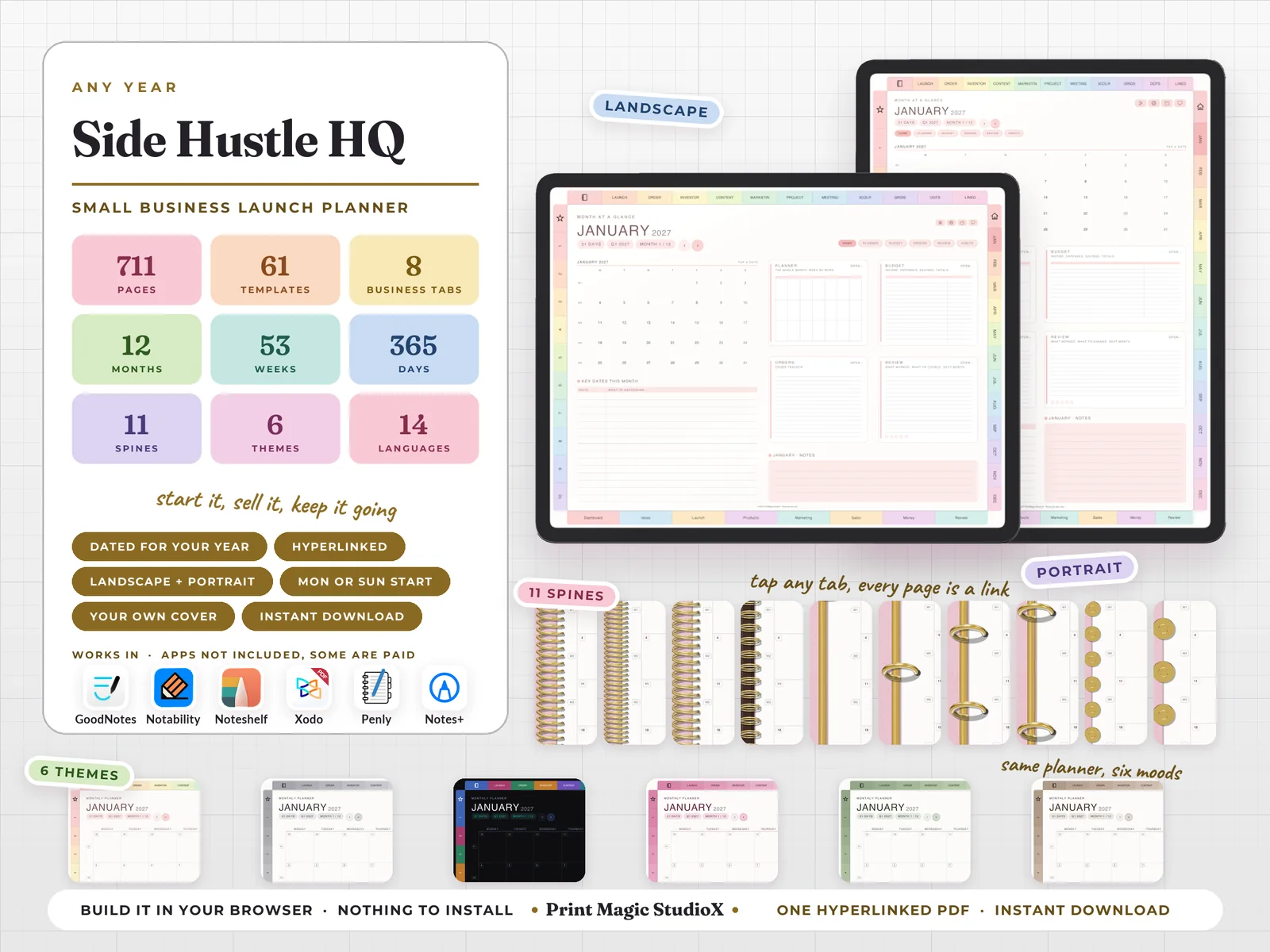
Nine choices, all yours
- 1
Which way round. Landscape or portrait.
- 2
Year. This one, next year, or any year ahead, dated for you.
- 3
Week start. Monday or Sunday.
- 4
Language. One of 14: English, 日本語, 한국어, Deutsch, Español, Français, 繁體中文, 简体中文, Italiano, Português, Nederlands, ไทย, Türkçe, Русский.
- 5
Theme. One of 6: Pastel Rainbow, White, Dark Mode, Pink, Matcha, Boho.
- 6
Ring and spine. 11 styles: coil, fine coil, twin wire, wire on a bar, 2 rings, 3 rings, 4 rings, 6 rings, discs, big discs, or none at all, in gold, silver, rose gold or black, down the left edge or in the middle as an open notebook.
- 7
Cover. The planner's own cover designs, or your own picture with your own words on it.
- 8
Your own sections. Ten sections of your own, named by you.
- 9
Note papers. The eleven included (Product Launch Checklist, Order Tracker, Inventory Tracker, Content Planner, Marketing Planner, Project Planner, Meeting notes, Three-column ruled, Small square grid, Classic dot grid, Classic ruled), or pick from two hundred more.
Inside
What you get
- ✓711 pages in one hyperlinked PDF, a little more when you add note papers of your own.
- ✓12 months, each opening on a Month at a Glance with its key dates, then the full calendar, the month's budget, an order tracker behind its own button, and the review that closes it.
- ✓61 week pages, one for every week of every month, with The One Thing across the top, open bands for the seven days, weekly anchors, a habit grid and what rolls over to next week.
- ✓365 daily pages in half hours from 6 am to 10 pm, with a to-do list, what you spent today, a brain dump, how tomorrow starts and notes.
- ✓4 quarterly planners, and a habit tracker for every month.
- ✓61 business templates in 8 tabs: Dashboard, Ideas, Launch, Products, Marketing, Sales, Money, Review — from the idea scorecard and the 12-week launch countdown to pricing, listings, the posting plan, the order log, profit split jars, tax set aside and the year-end statement.
- ✓An index with a link to every part of the planner, from the quarters and months to each tab's templates, the workbench papers and your own sections, and a page 2 that sets up every integration.
- ✓Tabs on every edge, landscape or portrait: months down one side, your own sections down the other, the 8 business tabs along the bottom and the workbench papers along the top.
Everything is a link
Tap a month tab and its landing page opens. Tap a date on any grid and that day opens. The + beside every hour on a daily page makes an Apple Reminder for that time, and the G beside it opens the hour in Google Calendar. Four Apple Shortcuts, Tools, Translate, Calendar and Chat, sit on every page but the cover and the index, set up once from page 2.
Write in it with
 GoodNotes
 Notability
 Xodo
Xodo Penly
Penly Notes+
Its links open
 Shortcuts
 Reminders
 Calendar
 Google Cal
 Translate
 ChatGPT
Templates
61 templates in 8 tabs
Each tab sits along the foot of every page inside, and has its own landing page.
7 templates
Dashboard
- Business at a glance
- Business map
- Shop facts
- Shop health check
- The week in the shop
- Hours and what they earned
- Business admin
7 templates
Ideas
- Idea dump
- Idea scorecard
- Who it is for
- The buyer I picture
- Market look
- Test before you make it
- Idea web
8 templates
Launch
- 12-week launch countdown
- Launch plan on one page
- Before the doors open
- Launch day run sheet
- First hundred sales
- Launch week, day by day
- Launch debrief
- Relaunch and restock
8 templates
Products
- Offer builder
- Product card
- Product catalogue
- Pricing worksheet
- Making plan
- Listing builder
- Photo shot list
- Stock and supplies
8 templates
Marketing
- Marketing plan
- Posting plan
- Post ideas bank
- Email list
- Words buyers search
- Collabs and shout-outs
- Paid ads
- Reviews and proof
8 templates
Sales
- Sales scoreboard
- Sales this month
- Order log
- Best sellers
- Who is buying
- Repeat buyers
- Orders to send
- Messages and care
8 templates
Money
- Profit split jars
- Money in, money out
- Business expenses
- Fees and what is left
- Tax set aside
- What the shop owns and owes
- Break-even and runway
- Paying myself
7 templates
Review
- Weekly shop review
- Month-end close
- Quarter review
- Wins and proof
- What worked, what flopped
- Hustle and rest
- Year-end statement
Good to know
Before you buy
- •You need an app that writes on PDFs: GoodNotes, Notability, Noteshelf, Xodo, Penly, Notes+ or any other. GoodNotes, Notability and Noteshelf are paid apps, some with a free tier; Xodo and Penly have free versions. Apps are not included.
- •The + beside every hour and the four Apple Shortcuts work on iPhone and iPad. The G beside every hour opens Google Calendar in your browser on any device.
- •Nothing to install and no account to make. On a computer the planner builds in your browser; on a phone or tablet we build it on our side and it downloads when it is ready.
- •For your own planning. Please do not share the file, your order code or the builder link.
- •A digital product: nothing is posted, and colours can look a little different from screen to screen. Our refund policy covers the rest.
$9.99 · one payment
Side Hustle HQ
Build it after checkout, and every year's edition after that with the same order.
Buying agrees to our terms and refund policy, and asks us to deliver the file straight away.
Questions first? Message us.